Silos
Menu

Product

Product overviewThe panelNeeds youAgentsTasksAutomationsSilosEnginesOpen source

Solutions

Solutions overviewCoding agentsA small businessSupportFinance

Resources

Compared with terminal tabs

Company

About

Docs

All the docsInstall

Product › Tasks

Talk to the agent, not to a ticket.

A task in Silos is a piece of work with an owner, a status and a history, given in one sentence to an agent, to you or to a teammate by name. It lives as an entry in a JSON file in the project folder, and it links to the conversations that work it.

Hand out work in a sentence, and see what will happen

New task is called Give. You write what and who it is for, and the button says what will happen before you press it.

For an agent On its own it reads "Give to Builder", with "Starts now, on its own". For one Only when told it reads "Give and open console ›", with "Opens with you — nothing starts without you". For you, "Add to my list".

New task

Export this month's invoices as CSV and PDF

  • WhoBuilder
  • Whereacme-shop
Give to BuilderStarts now, on its own
A task written in a sentence and given to an agent.

A task is a file you can read

Every project keeps its list in plans/tasks.plan.json. A task needs only an id, a title, an owner and a status; notes, dependencies, a due date and a wait on a person are optional fields.

You, the agents and Silos all read the same file. Agents learn the rules from the team-plan skill that Silos' plugin carries. Tasks are never deleted: Drop… sets one to cancelled with a note saying why.

plans/tasks.plan.json

{ "id": "t3",
  "title": "Close the month in the ERP",
  "owner": "finance",
  "status": "blocked",
  "dependsOn": ["t2"] }
  • Close the month in the ERPblocked · waits on t2
A task as a JSON entry beside its row.

A task and its conversations, linked both ways

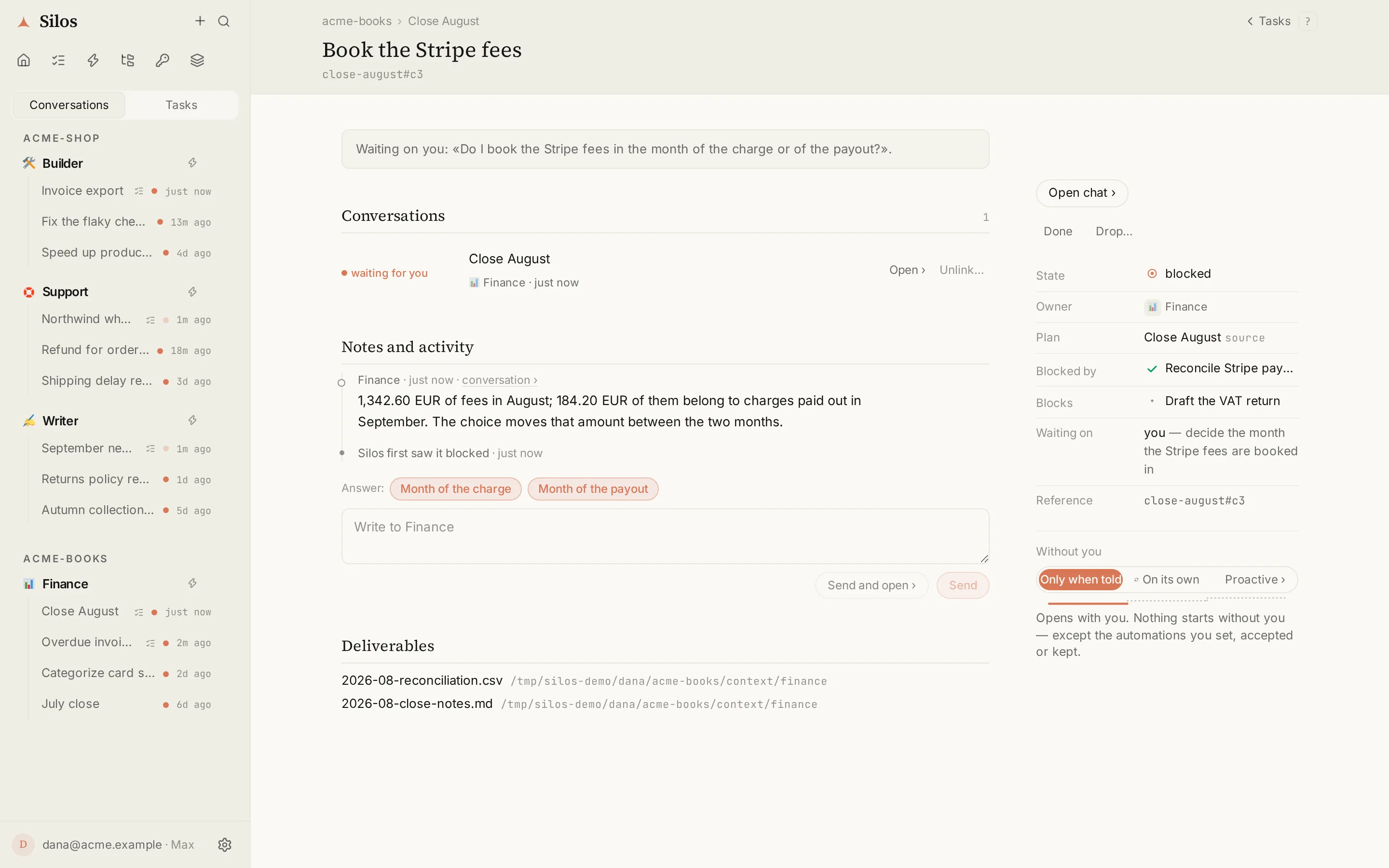
The link is made by a gesture, never guessed: Give, Start, opening the task's door, or "Make this a task" in ⌘K. When an agent takes a task on its own, it claims it, which links its conversation and sets the task in progress in one write.

The conversation's header says "Working on «title» ›", and the task page lists its conversations and who works it now. Letting go is Unlink….

A task waiting on the owner: an agent's question, its note with the amounts, and two answer buttons.
A task waiting on the owner, with the agent's question and two answers. Demo data.

Tasks compared with a shared spreadsheet

A shared spreadsheetSilos
Handing out workA row and a messageOne sentence with Give
Where it livesA file you ownA JSON file you own
Who is on it nowWhoever updates the rowThe conversation working it
Waiting on youYou notice, or notA row in Needs you
Steps inside one sessionThe engine's checklistStill the engine's checklist

Questions

Is the engine's checklist a Silos task?

No. Claude Code's TaskCreate and TodoWrite list, and plan mode's proposal, belong to one conversation and the engine. Silos shows them as the Checklist and «Plan mode · Claude's plan», and never turns them into tasks.

Does giving a task type into my console?

No. Giving a task or writing a note sends no keystrokes. Silos briefs the agent when you open a conversation on the task, or wakes an agent On its own in the task's conversation.

Can a teammate own a task?

Yes, by name. Silos has no door to a teammate: you see their tasks and waits, and you relay.

Should the plan files go in git?

No. plans/*.plan.json are live state, not code. Silos tidies the project's list at most once a day, moving tasks finished before the current month to plans/closed/.

What if an agent creates tasks for itself?

A task another agent creates shows up but wakes nobody. Putting an agent to work is always a gesture, unless you made it Proactive, which creates tasks from its mission up to a count a day.

Hand out the first task

Write one sentence, pick who it is for, and read on the button what will happen.