Silos
Menu

Product

Product overviewThe panelNeeds youAgentsTasksAutomationsSilosEnginesOpen source

Solutions

Solutions overviewCoding agentsA small businessSupportFinance

Resources

Compared with terminal tabs

Company

About

Docs

All the docsInstall

Product › Agents

An agent with a job, not a prompt you repeat.

An agent in Silos is an identity: a name, a mission in your words, the things it must never do, its folder, memory and skills, a territory it keeps out of and the secrets it is allowed. It runs on Claude Code or OpenCode underneath.

A name and a mission, written in your words

Welcome asks one question, "Who do you want working for you?": a name, what it will take care of, and where its files go. Press Create and the new agent reads its mission and answers on its page.

Lines that start with "Never:" say what it must always ask you about first, such as "Never: pay a supplier." They are a rule it follows, not a lock. Only you edit the mission; an agent can propose a change, and the proposal waits for you.
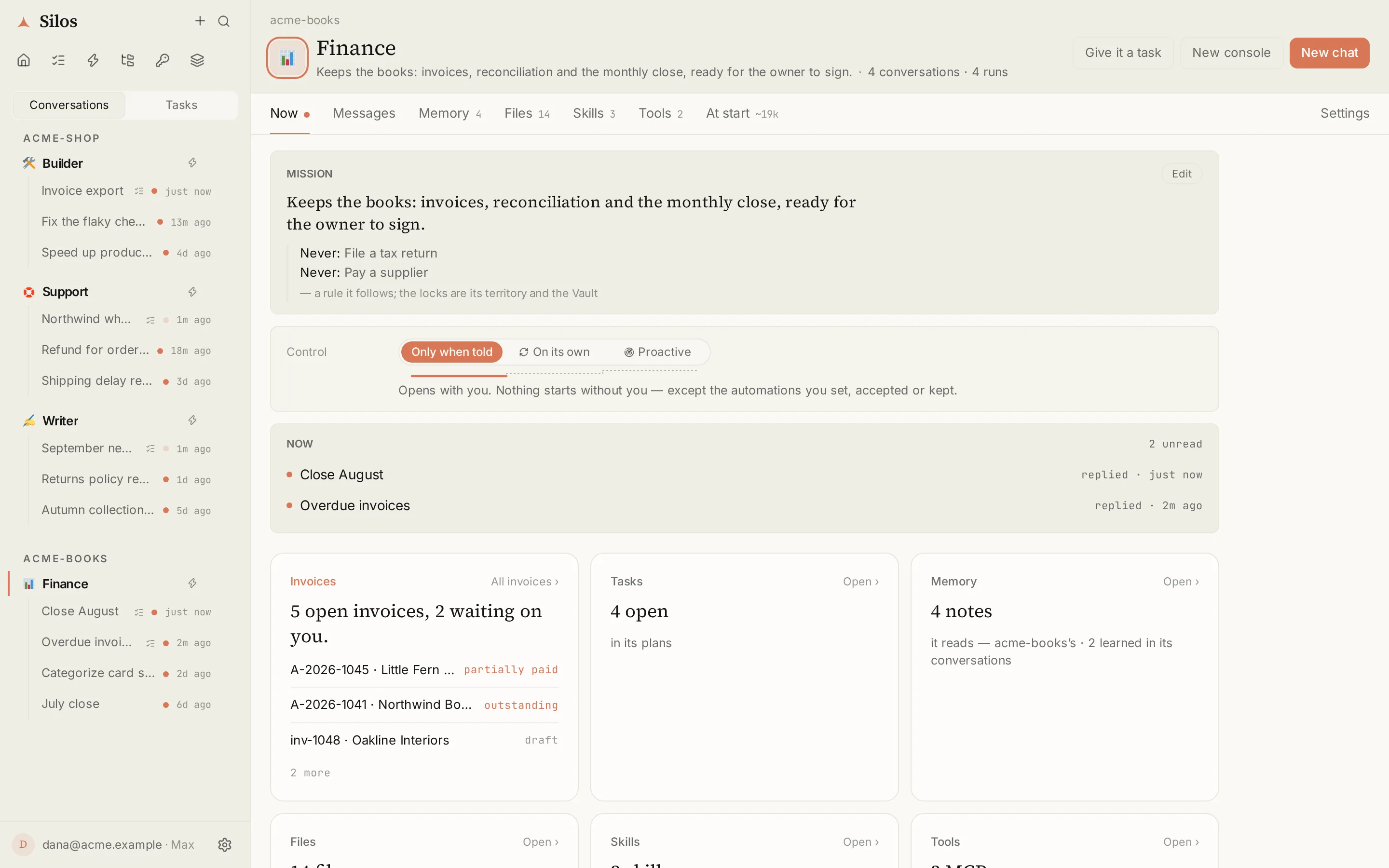
An agent's page: its mission, two things it must never do, its control setting and its open conversations.
An agent's page: its mission, two things it must never do, its control. Demo data.

Its memory and skills, and where each one comes from

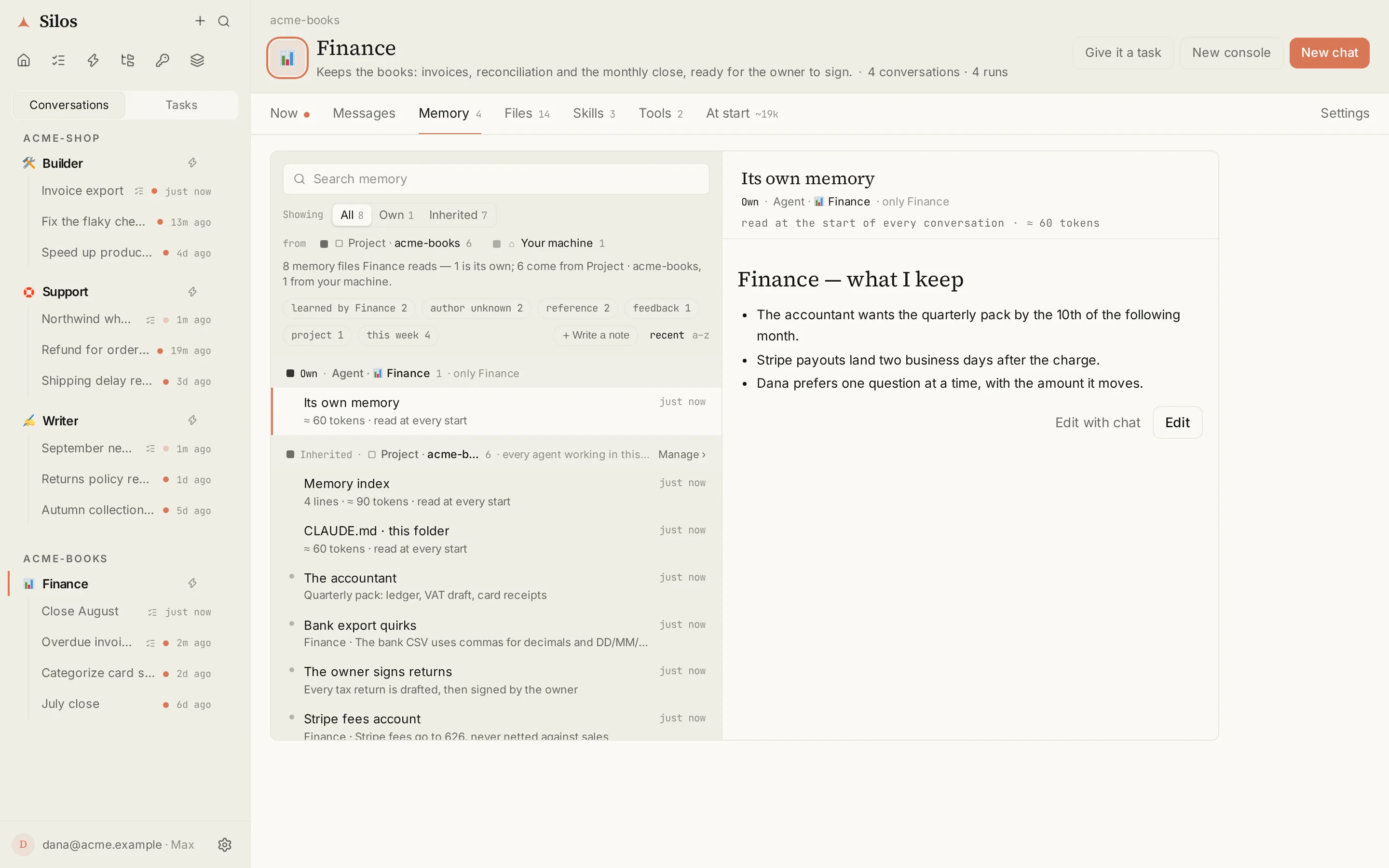
The agent's Memory, Files, Skills and Tools tabs show everything it reaches, grouped by owner: its own, its project's, your machine's. A note says who learned it and in which conversation, when that is known.

Several agents can share one project and its CLAUDE.md, notes and skills. Anything inherited says where it comes from and has Manage › to the page where it can be changed.

An agent's Memory tab: its own memory, six notes it inherits from the project and one from the machine, with a filter by owner.
An agent's Memory tab, filtered by owner. Demo data.

A territory, and secrets only it can see

Every new agent is born with its territory on: "Finance keeps out of your keys, your settings and other agents' desks." Silos hands the engine a deny list for its file tools, covering ~/.silos, your Claude login and settings, other agents' state and paths such as ~/.ssh.

Credentials go in the Vault, scoped to specific agents, one project or every agent. An entry can be Signed by Silos, so the agent calls a service through Silos and the value never enters its process.

  • reads and writesacme-books/
  • reads and writesits own state and memory
  • seesthe secrets you gave it
  • kept outcredentials and sign-in files
  • kept outother agents' private files
  • kept outSilos' own state
What an agent may and may not reach.

An agent compared with a notes file

A notes fileSilos
Its rolePasted into each sessionA mission read at every start
What it must not doA line you hope it readsNever lines, plus a file fence
CredentialsPasted into the chatIn the Vault, scoped per agent
Which notes it loadsGuess from the folderGrouped by owner, with Manage ›
One helper in one repoFine as it isAn agent is still worth a name

Questions

Is the territory a sandbox?

No. Settings says it plainly: "This is a fence, not a box — Silos does not sandbox the agent’s process." It holds the engine's file tools and a plain shell read like cat; a script or interpreter run in a shell runs as you.

Can an agent read my credentials?

With its territory on, its file tools are kept out of ~/.silos, your Claude credentials and your private paths. A Vault entry delivered to its environment is in its hands; a signed entry never is.

Can an agent change its own mission or skills?

No. Only you edit an agent's record. An agent can propose a change to its mission, or a skill, and the proposal waits for you in Needs you.

Does an agent need its own folder?

It needs one or more folders to work in. Silos suggests ~/Silos/<id> and creates it, or you pick an existing one, such as a repository you already work in.

Can two agents talk to each other?

Yes. Each agent meets the Silos API with its own token, including its inbox of messages. A message to you that needs you lands in Needs you.

Create your first agent

A name, a mission and a folder: Welcome asks for those three and nothing else.